FreshBooks vs Xero: Which one should I use in 2026?




Produced by our content partners and reviewed by Envoice’s internal experts to ensure it reflects real accounting workflows and accurate product usage.
As a small business, you probably feel that picking the right accounting software is an important choice that could impact the running of your company. You’re not wrong. With so many platforms claiming to be the ‘best accounting software ‘, trusting one platform with your finances is risky.
However, whether you’re a freelancer, solopreneur, self-employed, or SME, you’ll know that the right accounting platform is becoming more than a convenience; it’s a necessity for managing financial data. We bring you two popular choices: FreshBooks and Xero. By helping you gain clarity into the inner workings of these tools, you’ll feel confident when you make your final decision.
Key takeaways
- Pick FreshBooks if you bill clients for your time. It’s best for freelancers, solopreneurs, and service businesses that need fast invoicing, built-in time tracking, and minimal setup. The main account covers one user, with extra team members at $11/mo each.
- Pick Xero if you have inventory, multiple users, or an accountant. Every plan includes unlimited users, custom bank rules, and deeper reports.
- Consider adding Envoice if you choose Xero and need approval workflows or automated expense coding since Xero does not handle either natively.
Quick Overview
FreshBooks and Xero are accounting software built to help businesses manage their finances. FreshBooks is better suited for freelancers, solopreneurs, and self-employed professionals, while Xero is equipped for small and medium enterprises (SMEs), accountants, and startups.
Table of Contents
- FreshBooks vs Xero: Feature comparison
- Who are FreshBooks and Xero for?
- Main features: FreshBooks and Xero
- Conclusion
- FAQs: FreshBooks vs Xero
FreshBooks vs Xero: Feature comparison
| Feature | FreshBooks | Xero |
| Target market | Freelancers, solopreneurs, service-based businesses, self-employed | Self-employed, accountants, small business, nonprofit, startups |
| Industry | Marketing, creatives, construction, consulting, IT, legal, professional services, accountants. | Construction, retail, manufacturing, IT, healthcare, services-based businesses, hospitality, and agriculture. |
| Number of users | Single main user per FreshBooks account | Unlimited users |
| Automated bookkeeping tasks | Recurring invoices, automatic late-payment reminders, expense categorisation, receipt scanning from the Plus plan. | Bank rules for auto-reconciliation, automated invoice reminders, bill entry automation from the Standard plan, Smart Document Capture. |
| Invoicing capabilities | Quickly create unlimited customized invoices with payment links, recurring invoices, late-payment reminders, and billable hours. | Robust invoice customization, bulk invoicing, quote-to-invoice workflow, recurring invoices, payment reminders, and unlimited invoices. |
| Expense tracking | Simple expense tracking, receipt uploads, expense categorization and review. | Track expenses, reimburse expenses, and manage expenses on-the-go. Full expenses management for Xero powered by Envoice. |
| Sync bank accounts | Yes | Yes |
| Bank reconciliation | Basic reconciliation. | Rule-based bank reconciliation. |
| Project tracking and time tracking | Time and expenses per project. | Full project lifecycle. Time, profitability, costs, quotes to invoices, and track billable clients. |
| Mileage tracking | Yes | Yes, primarily through the Xero Me app. |
| Inventory management | Limited (not a core function). | Basic (quantities, cost of goods sold). Inventory Plus as an add-on. |
| Online payments/billing | Yes, through FreshBooks payments. | Yes |
| Cash flow management | Basic visibility via dashboard | Cash flow visibility and future cash flow projections. |
| Multi currency support | Yes, 150+ currencies | Yes, 160+ currencies, available on the Premium plan only. |
| Financial reports | Basic accounting reports | Advanced accounting reports |
| Mobile Application | FreshBooks mobile app | Xero mobile app |
| Accountant access | Limited, extra costs | Unlimited users, designed for accountant collaboration |
| Upfront with income and expense tracking and reports. | Supported upfront and through access to accountants (paid services). | Real-time income and expense tracking, with reports available on every plan |
| Payroll integration (advanced features) | Yes, powered by Gusto. FreshBooks payroll $40/month plus $6/month for each employee. | Yes, powered by Gusto. |
| G2 review | 4.5/5 Praised for ease of use, invoicing, customer support, and simplicity. |
4.4/5 Praised for ease of use, invoice management, and efficiency. |
| Pricing plans | Lite $23, Plus $43, Premium | Starter $29, Standard $50, |
| $70, Select custom pricing. | Premium $75. USD per month, | |
| USD per month, September 2026. | September 2026. | |
| Discounted rates at sign-up | Yes, up to 90% off for 3 months | Yes, 80% off for 3 months) |
| Free trial | 30-day all-feature access | One month free |
| Support | FreshBooks Help Center | Xero Central, JAX – AI Agent |
Expert insight: What Xero lacks in automation, it makes up for in its partnership with Envoice. Xero covers reconciliation and bill entry well, but approval workflows and mobile expense reporting are not its core feature set. An Envoice integration includes both, along with automated expense coding. Learn more about Envoice.
Who are FreshBooks and Xero for?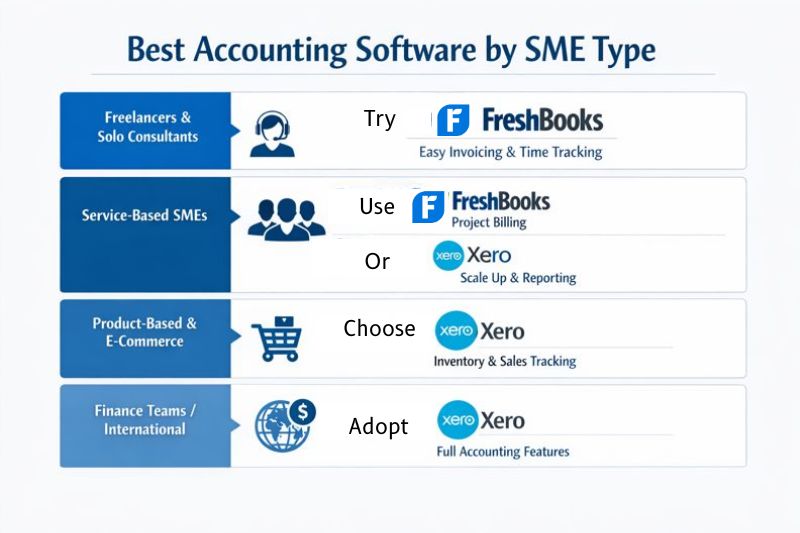
1. Freelancers, Solopreneurs, and Self-employed
Recommendation: FreshBooks
Why?
- Fast and professional invoices that can also be sent from the mobile app.
- Built-in time tracking increases the accuracy of your billing.
- Minimal setup, geared for very small businesses.
- Simple business tools that help you with expense management.
2. Service-based SMEs
Recommendation: FreshBooks or Xero
Why?
- Neither software has a steep learning curve, so you’ll be ready to start quickly and with minimal setup.
- Each software will help you track business performance with a customizable dashboard, analytics, and reports.
- Reduction of manual entry with basic automation features
- Both software provide multiple currencies for easy invoicing and payment.
3. Product-based or ecommerce businesses
Recommendation: Xero
Why?
- Comprehensive inventory tracking and product management.
- Strong bank reconciliation, with custom rules.
- 160+ currencies for easy invoicing and payment.
- Integrates with popular ecommerce platforms like Shopify.
Want to know how Xero stacks up against QuickBooks Online for SMEs? In QuickBooks Online vs Xero, we examine whether Xero is competitive against one of the world’s most popular accounting software. By doing this, the strength of Xero becomes easier to spot.
Which one should you choose?
| Your business | Recommended | Why |
|---|---|---|
| Freelancer or solopreneur | FreshBooks | Time tracking and invoicing in one place, minimal setup |
| Service-based SME, single user | FreshBooks | Faster to run day to day, lower cost at entry |
| Service-based SME, multiple users | Xero | Unlimited users included, no per-seat cost |
| Product or ecommerce business | Xero | Built for accountant collaboration, unlimited access |
| Business with an external accountant | Xero | Built for accountant collaboration, unlimited access |
| High volume of supplier bills | Xero + Envoice | Bill automation plus approval workflows |
| Multi-currency invoicing | Xero Premium | Multi-currency on the top tier only |
Main features: FreshBooks and Xero
Comparing FreshBooks and Xero accurately comes down to what they do for your business on a day-to-day basis. While both of these tools can manage your bookkeeping function, inventory, expense management, and other core processes, they are not equal in how they help you manage these functions.
FreshBooks: Built to get paid
The core idea around FreshBooks is to get small businesses paid quickly, which is crucial for cash flow and ongoing business activities. Even as a one-man (or woman) show, if you can bill quickly and accurately, get paid faster with payment links (for multiple currencies), and reduce administrative burdens, you have the essentials covered. When time tracking, invoicing, and expense management need to be tightly connected, you need a platform focused on making this happen.
Traditionally, small businesses have lagged behind their larger counterparts in the depth of financial oversight they have, but FreshBooks eliminates this barrier, allowing small businesses to compete at any level and do it anywhere they want.
Tax and audit compliance become easier with FreshBooks, and you begin to look more like a professional enterprise every day, rather than a small business relying on spreadsheets. To do this, FreshBooks concentrates on executing these main features with precision:
| Invoicing | Emphasis on invoice simplicity, payment links, recurring invoices, automatic payment reminders, and clear visibility into invoice status (all visible online and with the mobile app) |
| Expense tracking and cost visibility | Clear insight for owner-manager operations into where the money is going daily. Minimal data entry delivers faster financial data, and therefore fewer decisions are required to manage cash flow. |
| Time tracking and project management | Bill accurately sees where revenue leakage is. Know exactly what work is profitable with visibility into project billable and non-billable hours. |
| Financial reporting | Simplified, yet insightful business reports to make informed decisions. The system handles tax preparation and accurately allocates deductions. Financial statements are easily retrieved. |
FreshBooks pros and cons

- Pros: Fast invoice creation and payment links. Built-in time tracking tied to billing. Short learning curve. Good mobile app. 4.5/5 on G2.
- Cons: One user on the main account; extra members at $11/mo. Client limits on lower plans: 5 on Lite and 50 on Plus. Inventory is not a core function. Reporting is basic next to Xero.
Xero: Built for long-term oversight
The Xero platform has a more sophisticated approach to financial management that is geared towards long-term financial planning, as it integrates all the core business processes in one place. It concentrates heavily on invoice customization, payments, bills, tracking projects and analytics.
With Xero, the number of transactions is higher and likely more complex, so it calls for better automation, such as custom rules, automatic bank reconciliation, and expense categorization. The desire for complex data analysis also increases with business complexity, and Xero provides this through customizable accounting reports. Where Xero loses traction on approval workflows and employee reimbursements, Envoice integration quickly picks up the slack and provides automated approval workflows and employee reimbursements.
Xero helps you understand where money is coming from, where it’s going, how long it’s taking to arrive, and what business processes are consuming your hard-earned income. To deliver these insights, it concentrates its design power on the following features:
| Invoice customisation and management | Invoices are highly customizable for different industries and regulations. Multi-currency billing provides easy and quick invoice generation. |
| Costing and expense management | Automated capture and categorization of expenses. Strong and accurate reconciliation with custom rules. Better compliance trail for auditors. |
| Project management | Full-time tracking and project lifecycle management. Quotes to invoices with one click. Job costing and profitability dashboards for reliable costing information. |
| Financial reporting | Advanced reporting capabilities, cash flow forecasting, and multi-currency, multi-entity reports. Long-term data-driven decision-making. |
For SMEs already thinking beyond basic accounting and comparing Xero with more traditional accounting platforms, it’s worth checking where Xero fits into the landscape. In this Xero vs Sage comparison, we compare key features to position Xero as a viable alternative to more complicated platforms.
Xero pros and cons
- Pros: Unlimited users on every plan. Rule-based bank reconciliation. Cash flow forecasting, 30 to 180 days by tier. Full project lifecycle and job costing. Built for accountant collaboration, with 250,000+ accountants signed up.
- Cons: Starter caps at 20 invoices and 5 bills per month. Multi-currency is Premium-only. No native approval workflows or employee expense reimbursement. Steeper setup than FreshBooks for a single user.
Pricing compared
| Plan | Price (USD/mo) | Key limits |
|---|---|---|
| FreshBooks Lite | $23 | 5 billable clients |
| FreshBooks Plus | $43 | 50 billable clients, receipt scanning |
| FreshBooks Premium | $70 | Unlimited clients, project profitability |
| FreshBooks Select | Custom | Unlimited clients, 2 team members included, dedicated phone support |
| Xero Starter | $29 | 20 invoices, 5 bills, 30-day cash flow forecast |
| Xero Standard | $50 | Unlimited invoices and bills, 60-day forecast |
| Xero Premium | $75 | Multi-currency, 180-day forecast, industry benchmarking |
Switching from one to the other
- Export your chart of accounts, customer and supplier lists, and outstanding invoices from your current platform.
- Pick a changeover date, ideally the start of a financial period, and pull a trial balance as at that date.
- Import opening balances rather than full transaction history. Most businesses only need 12 to 24 months.
- Reconnect bank feeds and rebuild reconciliation rules, since these do not transfer between platforms.
- Re-enter recurring invoices and payment reminders manually.
- Reconnect integrations, including payment processors, payroll and any approval or expense tools.
- Run both systems in parallel for one full month and compare closing balances before switching off the old one.
FreshBooks Select includes data import via Easy Switch. Xero users moving from another platform typically work with an accountant or a migration partner.
Conclusion
In this FreshBooks and Xero comparison article, we looked deeply into the core business models of these SME-focused accounting platforms. By comparing features and zooming in on how they serve different SME types, we made the case that FreshBooks is suitable for self-employed individuals, freelancers, and small businesses. Xero, on the other hand, is suitable for product-based SMEs, service-based SMEs, and accountants. This is mainly due to its expanded automation and project management capabilities.
Both these platforms are excellent choices, but if you’ve decided on Xero but are concerned with the automation level, remember you can enhance these capabilities with an Envoice integration.
FreshBooks and Xero combined serve around 34.6 million users globally, and have been around for over 18 years, making them a stable and well-tested choice for SMEs of every type.
FAQs: FreshBooks vs Xero
1. What are the downsides of FreshBooks?
FreshBooks focuses on freelancers, solopreneurs, self-employed, and small service businesses. This makes it unsuitable for medium–to large–sized companies. It supports a limited number of users and lacks the advanced features of other popular accounting software. FreshBooks costs more than similar platforms. In reviews, this is often listed as a top con of FreshBooks.
2. Why do accountants prefer Xero?
Accountants prefer Xero because it offers many of the features they need for their business. They have an accountant partner program and provide a one-stop platform for practice management. To date, over 250 000 accountants are signed up for Xero services, allowing better collaboration across the accounting industry. Xero also provides training and resources to help accountants grow their businesses.
3. Which is best for inventory-heavy businesses?
Xero. It tracks quantities and cost of goods sold natively, with Inventory Plus as a paid add-on. FreshBooks treats inventory as a peripheral function.
4. Does either integrate with Shopify?
Xero does, along with most major ecommerce platforms, which is why it suits product-based businesses. FreshBooks has fewer ecommerce integrations and is built around service billing.
5. How hard is it to migrate between them?
Plan for a month of overlap. Opening balances, contacts and outstanding invoices transfer reasonably well. Bank rules, recurring invoices and integrations have to be rebuilt by hand. FreshBooks Select includes Easy Switch for data import.
6. Can multiple people use the same account?
Xero includes unlimited users on every plan. FreshBooks charges $11/mo per additional team member, with two included on Select.
7. Which is cheaper overall?
FreshBooks Lite at $23 is the cheapest entry point, but the gap closes once you add team members. A three-user business pays $23 plus $22 on FreshBooks Lite versus $29 flat on Xero Starter.
8. Do I still need an automation tool with either?
Both handle reconciliation and invoicing. Neither has native approval workflows or employee expense reimbursement, which is where an integration like Envoice fits, particularly for businesses processing a high volume of supplier bills.
Articles you might like



STAY ALWAYS TUNED
Subscribe to newsletter
Still not sure?
- Don’t spend time on manual work
- Streamline bookkeeping processes with AI
- Automate invoice processing
- Integrate with the tools you rely on every day