Tipalti vs Bill.com: Which is Better Suited For AP?



Produced by our content partners and reviewed by Envoice’s internal experts to ensure it reflects real accounting workflows and accurate product usage.
We know that finance decision-makers don’t examine the differences between Tipalti and BILL (formerly bill.com) because they want another piece of software. It’s really about better cash flow management, reduced labor costs, faster payment processing and improved supplier management.
In this article, we take an in-depth look at the value each of these software solutions offers your business by examining how well they meet the demands of different operational complexities.
Quick Answer
Bill.com focuses on accounts payable automation for growing businesses, while Tipalti is designed to automate and scale complex finance operations. The right accounting software depends less on features and more on the complexity of your supplier network, payment requirements and organizational structure.
Table of contents
- How AP maturity affects your choice of accounting system
- Quick Comparison: Tipalti vs Bill.com
- How Bill.com addresses accounts payable challenges
- How Tipalti addresses accounts payable challenges
- Is Tipalti or Bill.com better suited to your AP process?
- FAQs: Tipalti vs Bill.com
How AP automation maturity affects your choice of accounting system
At a baseline level, there’s an assumption that AP automation is about speeding up payments. In reality, the complexity of the AP process for finance operations lies in everything that happens before and after the payment.
As financial operations grow, finance teams face larger invoice processing volumes, more suppliers to onboard and manage, multiple approval levels, global payment gateways, and tax compliance across multiple jurisdictions.
This kind of complexity quickly becomes unmanageable with a manual AP process. At this point, you either increase headcount or find a unified platform to handle the heavy lifting.
BILL and Tipalti both answer this call, but the benefits of each become clearer when you examine how their features address the different levels of AP complexity. 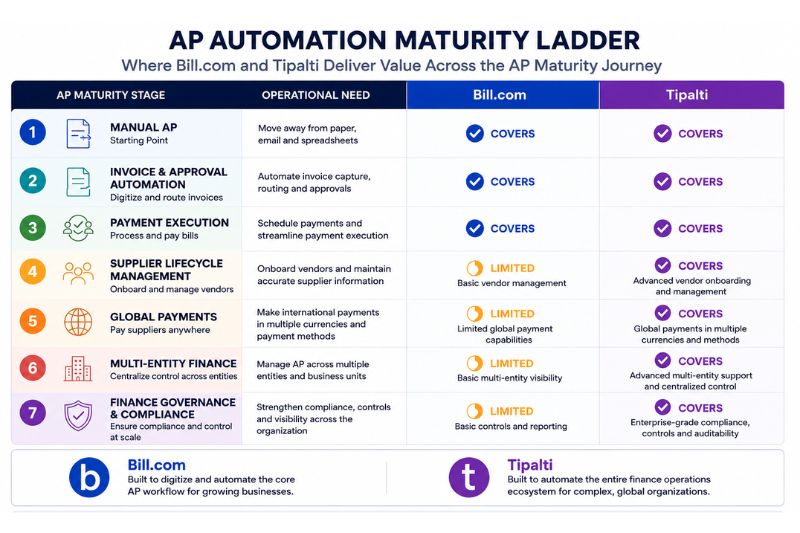
Quick Comparison: Tipalti vs Bill.com
The simplest way to understand the difference between Tipalti and BILL is:
- BILL solves: ‘We have a payment process, let’s make it digital’.
- Tipalti solves: ‘We have complex AP needs, let’s automate the entire ecosystem’.
| AP Complexity Level | Operational needs | Main challenge | Recommended Fit |
| Single entity small business with a simple payment process | Invoice management, bill approvals, AP automation | How do we eliminate manual data entry and manual payments? | Bill.com |
| Growing company, increasing supplier database, multi-level approvals | Strong workflows and scalability without headcount increase | How do we automate the accounts payable process while maintaining visibility and control? | Either |
| Multiple entities, multiple payment methods, international payments, large supplier base | Strong approval workflows, vendor management, mass payments, strong financial controls and global payment execution | How do we scale operations across multiple entities without adding to our finance teams each year? | Tipalti |
| Enterprise-scale finance operations | End-to-end AP automation with strong compliance | How do we standardize, automate and govern complex global operations while maintaining compliance risks? | Tipalti |
How Bill.com addresses accounts payable challenges
Bill.com is designed to help growing businesses move away from processing payments manually to establishing a more efficient digital workflow. To do this, BILL combines several key AP automation features to simplify invoice management and streamline approvals.
1. Automated invoice management process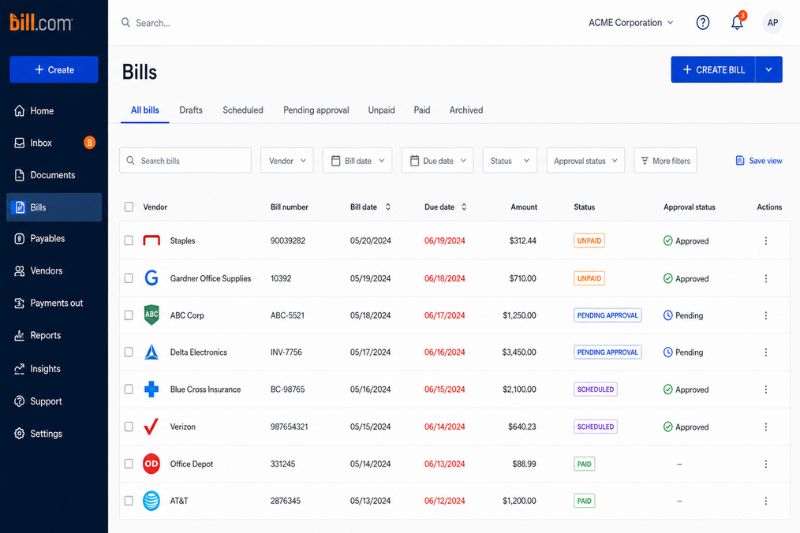
Rather than managing invoices streaming into different email inboxes and paper document collection, Bill.com centralizes invoice data within a single platform.
The benefits for modern finance teams are:
- Greater visibility over unprocessed invoices.
- Better control over the approval process.
- Automated payment reconciliation.
- Digitization of documents for easier retrieval and sharing.
2. Approval workflows
As business operations evolve, approvals become more time-consuming and admin-heavy. A frequently quoted phrase in AP teams (which happens to be spot-on) is that your payments are only as fast as your slowest approver.
Bill.com addresses this challenge by routing invoices directly to the appropriate reviewers and approvers based on customized rules. Because approvals can be done with one click, it eliminates the traditional email approval process.
3. Payment processing
Once invoices have been approved, Bill.com enables finance teams to process payments directly on the platform. Rather than managing multiple bank portals, users can schedule payments from the centralized dashboard.

BILL supports ACH bank transfers, virtual card, credit card payments, international wire transfers and paper checks. Your business can accommodate supplier preferences without losing visibility into total cash flow.
4. Expense management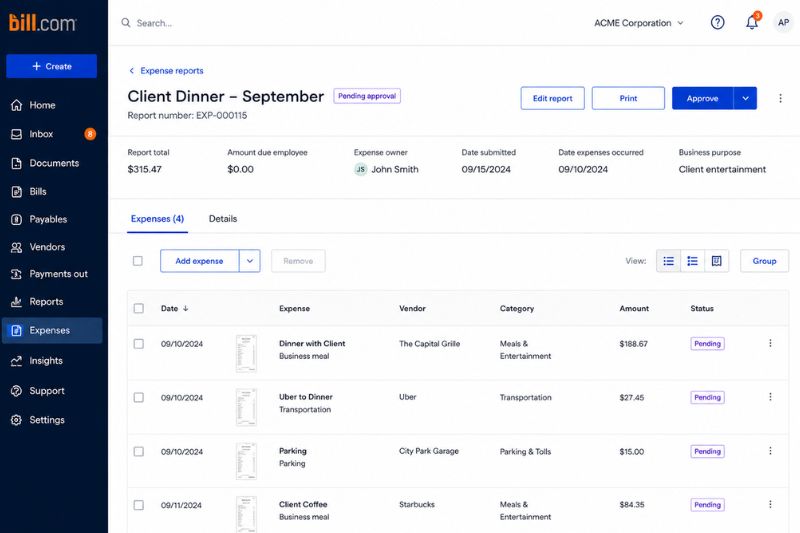
Complementing BILL’s AP solution is the expense management feature, giving your business control over employee spending and reimbursement. Employees can submit expense reports digitally and attach receipts using their mobile device. Approvers can then review, approve and reimburse expenses.
This is one area in which Bill.com differentiates itself. Managing these two processes together improves the visibility of company-wide spending while reducing administration. Growing businesses often value accounting systems that accurately reflect actual business spending because they consolidate key functions such as AP and expense management.
Bill.com pricing: Subscription tiers range from $49 per user per month to $89 per user per month. Enterprises will need to request custom pricing to unlock multi-location accounting capabilities.
Bill.com reviews: BILL is highly rated on G2 with a 4.5 out of 5 rating.
How Tipalti addresses accounts payable challenges
Tipalti approaches accounts payable from a much broader operational perspective by automating the entire payment ecosystem. Businesses that require multi-entity support, a self-service supplier portal, and a complex global payment process will find that Tipalti meets those needs.
Beyond the basic AP functionality, Tipalti was built to address these challenges.
1. Advanced vendor management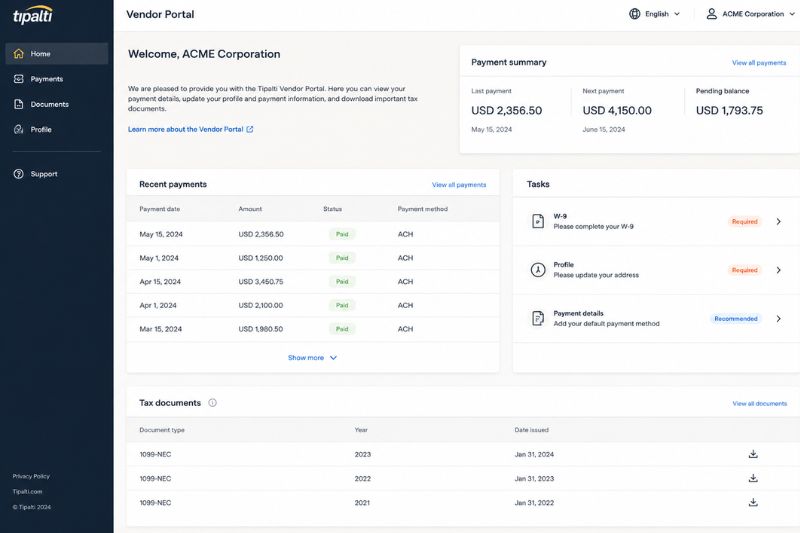
One of Tipalti’s key differentiators is its self-service supplier portal, which makes vendor management more efficient. Suppliers are able to:
- Load personal or business details.
- Update banking details.
- Submit tax forms (such as the W-9 for contractors).
- Manage payment preferences and track payments.
- Maintain documentation.
This function reduces administration across the entire finance operation and improves supplier relationships. Tipalti offers 50+ payment methods and cross-border payments to 200+ countries. These payments are backed by money transmitter licenses and compliance.
2. Global payables at scale
Manual entry across multiple bank portals and payment gateways creates administrative challenges, costly overheads and extra fees. With Tipalti, businesses can schedule payments across multiple countries and currencies from a single platform.
Tipalti automatically remits funds to suppliers using their preferred payment method, without your finance team needing to intervene. Payments are triggered from invoices, and payments are reconciled and sent to your ERP and accounting systems in real-time.
3. Multi-entity support
Many businesses operate as a single legal entity. For example, there is one bank account, accounting system, finance team and one set of books. That makes accounts payable simple.
However, when you’re expanding globally, multiple entities are often required. This complicates financial management. Every invoice raises new questions.
- Which entity does this invoice belong to?
- Which bank account should be used?
- Which manager approves the invoice?
- Which country’s tax rules apply?
Without a unified system, finance teams end up maintaining separate AP processes, reproducing information in spreadsheets, compiling complex reports for Head Office, and facing other well-known challenges.
Sound familiar?
Tipalti addresses these frustrations by providing entity-specific approval workflows and reporting, centralized supplier management and consolidated reporting. Practically, this means you can scale without creating a new finance team for every entity.
4. Advanced financial controls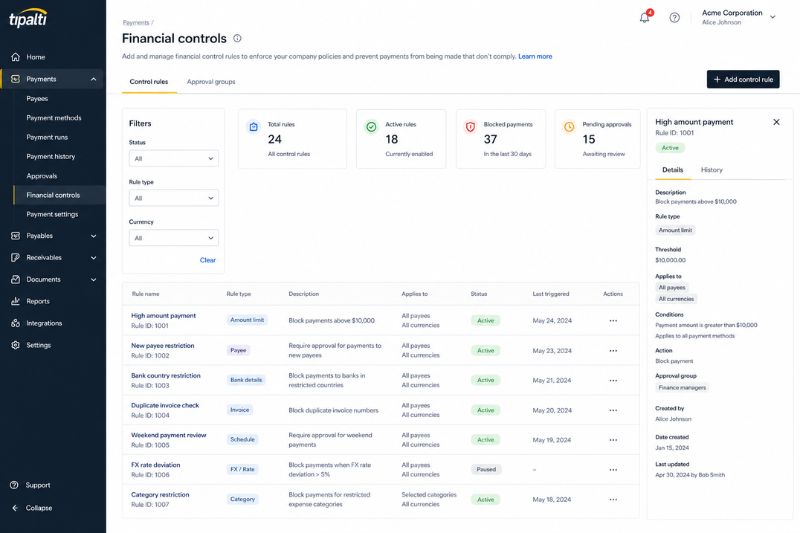
When invoice volumes increase rapidly, finance managers become more concerned about duplicate payments, fraud, and missed compliance checks.
Finance controls are the policies, approval frameworks, audit trails and safeguards that ensure your AP process runs smoothly and that compliance requirements are met. They may include elements like audit logs, approval tracking, vendor validation and payment authorization levels.
Tipalti excels in this area because it was built as a governance-first system for mid-sized businesses and enterprise companies. It allows businesses to implement approval processes across multiple entities, departments and spending categories. Every action is tracked, creating a clear audit trail.
Tipalti pricing: Plans start at $99/month. Enterprises will receive a custom quote based on the advanced features they need, such as FX hedging and multi-currency fund management.
Tipalti reviews: Tipalti has a strong 4.5 out of 5 rating on G2.
Is Tipalti or Bill.com better suited to your AP process?
Tiplati and Bill.com are often compared as though they solve exactly the same AP challenges, but that comparison isn’t the entire story.
Both platforms are highly recognized for their strong AP automation features, improved financial visibility and increased payment efficiency. The difference, however, lies in the level of operational complexity they are designed to support.
For businesses moving into a digital workflow, Bill.com provides an accessible path to AP automation. However, companies with multiple entities will find that Bill.com has limited functionality in this regard. In this case, Tiplati will add more value to your AP process.
FAQs: Tipalti vs Bill.com
1. Tipalti vs Bill.com: Which one is better?
Which platform is better depends on the complexity of your AP process. Bill.com is better suited to single-entity businesses making the transition from manual AP to automation. Tipalti is a stronger fit for multi-entity businesses that manage global payments, large invoice volumes, extensive supplier networks, and require advanced compliance controls. Bill.com also supports international payments and financial controls, but Tipalti offers greater complexity within the AP function.
2. Are Tipalti and Bill.com only AP automation software?
No. While both Tipalti and Bill.com are valued for their accounts payable capabilities, they also offer additional features, such as accounts receivable and expense management. Bill.com is useful for businesses looking to consolidate their financial operations into one platform. Tipalti is an all-in-one AI-powered automation platform that simplifies global transactions, procurement, treasury and mass payments.
3. Do Tipalti and Bill.com integrate with accounting software?
Yes. Both Tipalti and Bill.com integrate with a variety of accounting software. BILL integrates with Xero, QuickBooks, Sage, Oracle NetSuite and Acumatica. This makes it a practical choice for small and medium-sized businesses. Tipalti offers integrations with NetSuite, QuickBooks, Sage Intacct and other popular ERP systems. For a complete list of integrations, visit the Tipalti and Bill.com websites.
4. Is there anything better than Bill.com or Tipalti?
Top platforms cater to different industries, AP complexity levels, and operational requirements. Therefore, what makes another automation software better than BILL or Tipalti will depend on your business needs. However, based on user feedback and ratings, Stampli and Ramp are often compared with Tipalti, and Melio is Bill.com’s strongest competitor for small businesses.
Not every business needs the AP infrastructure offered by BILL or Tipalti. If you’re looking for user-friendly and affordable automation software that works especially well with QuickBooks or Xero, try Envoice. It has a powerful automation, expense management, and approvals suite that enhances what QB and Xero can do.
Articles you might like



STAY ALWAYS TUNED
Subscribe to newsletter
Still not sure?
- Don’t spend time on manual work
- Streamline bookkeeping processes with AI
- Automate invoice processing
- Integrate with the tools you rely on every day