How Duplicate Invoices Happen and How To Stop Them

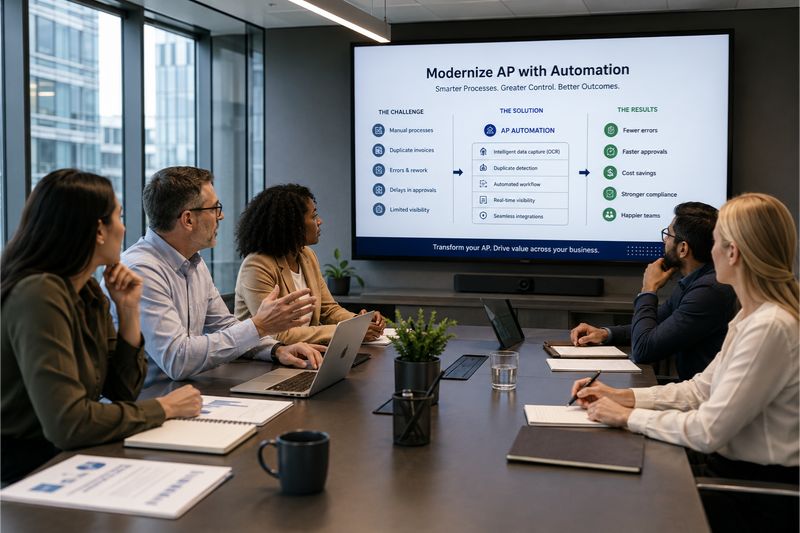


At some point, every AP team asks: Why do duplicate invoices enter our accounts payable process and survive the internal controls that should catch them?
The answer matters because duplicate payments can slip through affecting the company’s cash flow. In this article, we examine how AP automation, OCR, and advanced data extraction turn invoice data into structured, comparable information and prevent financial losses at the source.
Quick Overview
Duplicate invoices are a persistent source of financial leakage in accounts payable, often caused by fragmented processes. Preventing them requires more than merely matching invoice numbers. Effective controls must also identify when different documents represent the same transaction. OCR, intelligent data extraction and automation allow systems to detect the same invoice or vendor across multiple fields before payment is made.
The impact of duplicate invoices for businesses
Studies by organizations such as the American Productivity & Quality Center (APQC) show that between 1.0 and 2.5% of total annual disbursements come from duplicate or erroneous invoices.
These numbers seem small, but even a relatively low duplicate-payment rate can represent a significant financial loss when applied across the company’s annual disbursements.
Let’s assume a company pays $20,000 twice. You immediately have a $20,000 shortfall in available cash. To solve this, someone has to identify the problem, investigate it, request recovery, reconcile the account and correct the accounting records. Not only does it impact your cash flow, but it also puts pressure on your vendor relationship.
That is why you must stop this leak as early as possible, before duplicate or fraudulent invoices reach a point where they can slip through the cracks. Accounting automation gives you the best chance of doing this.
5 Primary causes of duplicate invoices and payments
Framing duplicate invoices as purely an “employee or vendor oversight issue” oversimplifies the problem. Processing invoices is anything but a simple process and involves many touchpoints. Before you can move to automated invoice processing, you need to understand where the biggest risks arise and how automation can reduce them. 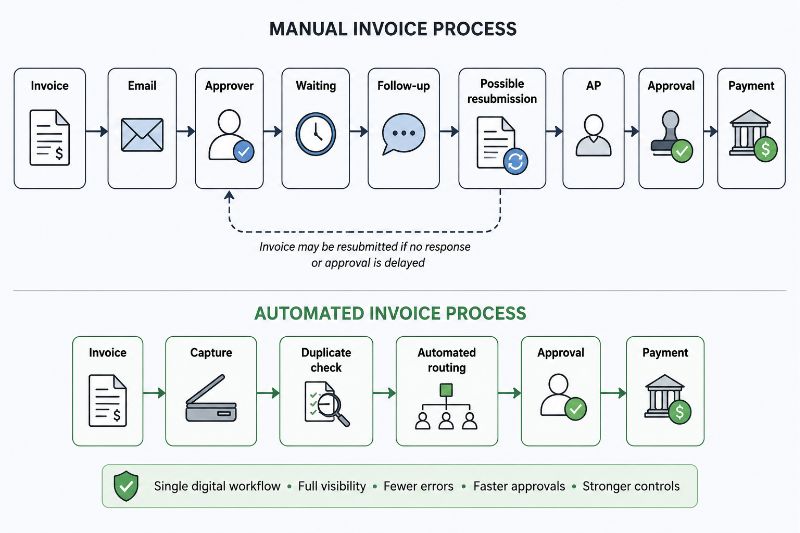
Manual data entry
Manual entry is slower than machine data extraction and more error-prone. Where data varies, internal controls like exact invoice matching fail.
For example, WER-10458 could be entered as 10458. This is the same transaction, but without specific checks in the process, this could end up being paid twice. Very tight manual controls are required to catch these variations, putting the burden on the AP team to catch them before payment.
Optical Character Recognition (OCR) and intelligent data extraction address this problem by automating invoice data extraction, reducing manual transcription and creating standardized fields for downstream validation and matching. Scanning and data capture tools can achieve 99% data-capturing accuracy, reducing manual entry errors.
Vendor behavior
Vendors do not always send invoices in a perfectly controlled or predictable way. The same vendor may resend an invoice if they believe it was not received or paid. Sometimes they do this through multiple channels or with slightly different invoice details. They may also re-issue an invoice with changed vendor details, vendor name or account details. This makes manual matching more difficult because it doesn’t match vendor records.
Existing records are the foundation for cross-checking information, but when that fails, duplicate invoice detection fails too.
In this case, automation removes dependence on supplier behavior. Data extraction compares invoices on multiple data points such as supplier identity, invoice number, amount, date, PO and other fields. Where the data points overlap, the transactions are flagged as duplicate entries for human review.
Multiple invoice channels
Invoices can enter a company through email, supplier portals, EDI, shared inboxes, scanned documents and paper invoices. When these channels are handled separately, the same invoice can enter the accounts payable system repeatedly.

For example, a vendor emails an invoice and uploads it to the supplier portal. If different team members handle it, it can be processed as two transactions. The problem is fragmented visibility. As previously mentioned, you can’t avoid duplicate invoice payments if you can’t see them.
AP automation systems solve this by providing a centralized intake point. By creating a dedicated email address for your business, invoices from different channels are brought into the same workflow. This empowers accounts payable teams to detect duplicate invoices early on.
Internal processes
Processing invoices requires several stages, and at each stage, duplicate or fraudulent invoices can slip through the cracks. The risk increases when different people, teams or accounting systems are involved.
The problem isn’t just manual data entry errors, duplicate records and identical invoices slipping through. It also depends on people doing the right thing at the right time. We’ve been alluding to the role of human intervention throughout this article because, in a manual process, it bears the most weight.
When you automate invoice processing, you move the burden of compliance from the people to the system. In other words, the checks are safely embedded into the invoice workflow. Once the invoice is captured, matching rules find the applicable purchase orders and verify invoices. The system will flag duplicates for human review, allowing only legitimate invoices through for payment.
Automation does not eliminate the need for AP staff. It frees up your team’s AP time to focus on more strategic tasks.
Fragmented approval processes
Fragmented approval processes create one of the biggest compliance risks in the AP process. When approvals are handled via email, spreadsheets, shared folders and different teams, there is no single visible workflow that shows the invoice status.
Let’s explain it like this. An invoice may be forwarded multiple times, returned for clarification, resubmitted by the supplier and entered again because the original is stuck awaiting approval.
The danger of a fragmented approval process can be seen in this example:
An urgent invoice for $250,000 is with a manager for approval. The manager doesn’t respond, and the vendor assumes it wasn’t received. They resubmit and accidentally use a different invoice number. The second invoice is processed separately and sent to another manager for approval. Both invoices are approved.
The answer is to streamline your approval routing process using automation. You can empower your team with multi-level approval limits, auto-assign tasks to the correct person, and auto-approve invoices within a certain range.
A single digital record and a controlled path are created for every invoice, decreasing the risk of double payments. 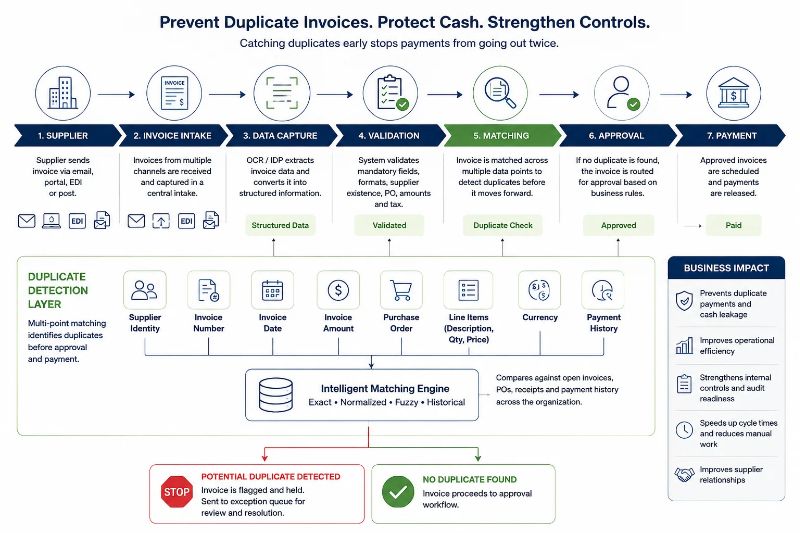
How automation addresses the root causes of duplicate invoices
Throughout this discussion, we’ve been looking at how duplicate invoices are rarely an isolated incident. Rather, they are a symptom of structural weaknesses across an AP process. Each gap creates an opportunity for the same financial transaction to be processed (and paid) twice.
The solution, therefore, is not simply how to handle a duplicate invoice, but to address the areas that allow them to occur in the first place. This is where we suggested that automation plays a large role in preventive financial control. In summary, automation attacks the root problem as follows:
| Root cause | Manual process | Automation process | Root cause addressed? |
|---|---|---|---|
| Multiple invoice channels | Separate inboxes/queues creating fragmented visibility | Centralized invoice capture brings all information into one workflow where checks can be applied | Yes |
| Manual data entry | Human data input creating room for error | OCR/data extraction automatically scans invoices and converts them to machine-readable data for comparison | Yes |
| Duplicate vendor records | Manual master-data review may not identify different vendor names and IDs belonging to one vendor | Automated vendor matching identifies duplicate information across multiple attributes | Partly |
| Fragmented approval systems | Approvals from multiple sources are difficult to track | Automated workflows route the invoice to the correct approver and keep a single status and audit trail | Yes |
| Payment authorization | Manual checking relies on AP staff identifying fraud or duplicates before payments are authorized | Automated pre-payment checks and routing to the correct person for payment | Yes |
If you haven’t had a chance to measure the impact of automation in your AP process yet, then the next step is to test what these platforms can do. Try a platform, like Envoice, that offers a 14-day free trial. The trial allows you to see how automation can work in your business without an obligation to purchase the software.
To get you started, here are the Top 5 Accounts Payable Automation Solutions for 2026.
FAQs: Duplicate Invoices
1. What is a duplicate invoice?
Duplicate invoices are multiple invoices submitted for the same goods or services. This can happen for several reasons, such as incorrect data entry, multiple submission channels, vendors resending invoices and fragmented approval processes. Fake invoices can also be sent to exploit weaknesses that fraudsters have identified in a company’s AP process. Duplicate invoices pose a compliance risk for businesses.
2. Can automation prevent duplicate invoices?
Automation technology can greatly reduce the chances of duplicate invoices being processed by flagging them. Technology such as OCR, intelligent data extraction, invoice matching and automated workflows strengthen your internal AP processes. Rather than being the sole preventative measure against duplicate invoices in the AP process, technology flags suspicious transactions for human investigation and review.
3. How do you handle duplicate invoices?
To prevent duplicate payments, it is essential to stop them before processing rather than trying to recover them later. Accounts Payable (AP) automation systems help teams avoid duplicate payments by cross-referencing incoming information across multiple fields. If invoices share the same invoice number, goods receipt notes, invoice date, vendor, or other relevant details, the system will flag them for human review.
Manually handling a duplicate invoice requires you to cross-check financial records and match the invoice to the correct purchase order. During this process, you may need to place the invoice on hold until your review is complete.
4. What is optical character recognition and what does it do?
Optical character recognition or OCR, is technology that reads text from documents such as scanned invoices, PDFs and images. It converts the different formats into machine-readable data. In accounts payable, it reads data from multiple fields such as invoice number, date, vendor details, goods and services description and invoice amount. The system can then evaluate this information before sending it for review or approval. This process happens without human data entry and reduces errors in invoice processing.
Sources:
Produced by our content partners and reviewed by Envoice’s internal experts to ensure it reflects real accounting workflows and accurate product usage.
Articles you might like

STAY ALWAYS TUNED
Subscribe to newsletter
Still not sure?
- Don’t spend time on manual work
- Streamline bookkeeping processes with AI
- Automate invoice processing
- Integrate with the tools you rely on every day