QuickBooks Online vs Xero: Which accounting software is the best in 2026?


When it comes to online accounting software, two names often come to mind – Xero and Intuit QuickBooks Online. Marketed as the ideal tool for small businesses, many entrepreneurs and SMEs wonder if they are better off using Xero or going for QBO.
In the US, QuickBooks has become a household name for small business accounting. Intuit, the company behind QuickBooks, launched an online version of its accounting software to cater to small business owners. As the needs of businesses evolved, so did QuickBooks Online. QBO now offers comprehensive features to support the accounting needs of companies from start-ups to growing businesses with complex needs.
Xero, on the other hand, stands out for its simplicity and ease of use. Designed with entrepreneurs and business owners in mind, Xero is easy to navigate and understand. Compared to QuickBooks, Xero is also more budget-friendly. In this guide, we will see how Xero compares to QBO.
Let’s get started.
Quick Overview
QuickBooks Online and Xero are leading accounting solutions for 2026, with QuickBooks offering robust reporting for complex workflows and Xero providing a simplified, user-friendly interface. While QuickBooks is favored in North America for its deep feature set and tax compliance, Xero is a popular choice globally for its budget-friendly entry tier and support for unlimited users.
QuickBooks Online vs Xero: A Snapshot 
Source: QuickBooks.com
QuickBooks Online
QuickBooks Online markets its accounting software as the world’s number one, with more than 5.6 million users. Intuit, the company behind QuickBooks, has been around since 1983 and is a trusted name for providing both online and offline accounting and tax solutions. As one part of Intuit, QBO is an established brand in the market.
QuickBooks has also ventured into providing additional services like QuickBooks Payroll and QuickBooks Time for project management and time tracking, creating an ecosystem that makes it easy to support the finances and needs of growing companies.
Xero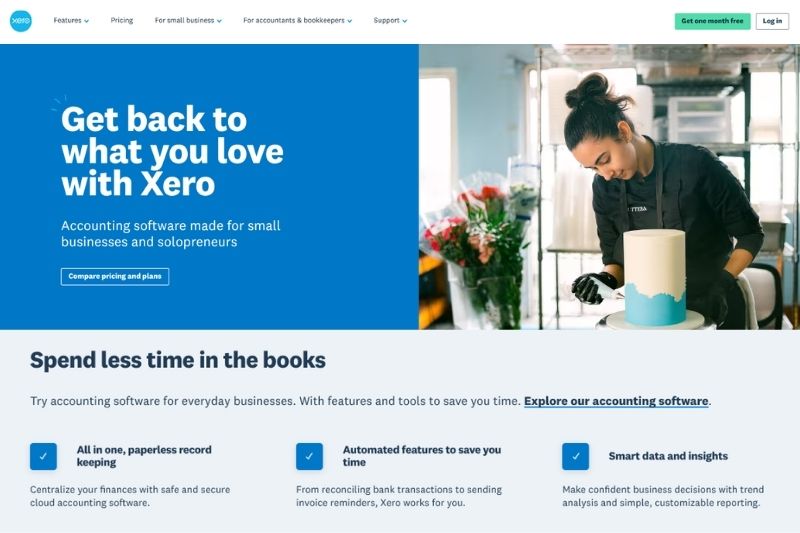
Source: Xero
Xero is a professional cloud-based accounting solution founded in New Zealand in 2006. With 3.5 million users, Xero has its fair share of subscribers. Simplicity is at the core of Xero and it provides an open platform that allows integration with various services to make accounting tasks easier and more efficient.
Xero makes up for missing features by offering solutions from third-party apps like Dext for receipt capture or Envoice for automating invoice approvals.
Pricing
QuickBooks Online Plans
QuickBooks Online offers the following plans: Simple Start ($38 monthly), Essentials ($75 monthly), Plus ($115 monthly), and Advanced ($275 monthly).
QBO offers various discounts and promotions, like 50% off on all plans for 3 months. New users are also eligible for a free 30-day trial for QBO. QuickBooks Online subscriptions also include free access to the Assisted Bookkeeping feature for 30 days.
Prices only include a monthly subscription for the accounting software; there are additional fees for add-ons like the payroll service or time tracking. Actual prices may vary depending on your region.
Xero
Like QBO, Xero offers a 30-day trial for new users. There are also year-round subscription discounts, like a 60% discount on your subscription for the first 4 months. Xero pricing is as follows: Early ($25 monthly), Growing ($55 monthly), and Established ($90 monthly). Prices may vary depending on your location and ongoing promotions.

QuickBooks Online vs Xero: Side-by-Side Comparison
| QuickBooks Online | Xero | |
|---|---|---|
| Pricing Plan* | Starts at $30/month (30-day free trial available) | Starts at $15/month (30-day free trial available) |
| Features |
Unique QuickBooks Features:
|
Unique Xero Features:
|
| Integrations | Over 750 apps | Over 1,000 apps |
| Security | QuickBooks Data Security ISO/IEC 27001:2013 certified | Xero Data Security ISO/IEC 27001:2013 certified |
| Cloud storage | Yes | Yes |
| Interface | SaaS/Cloud/Mobile | SaaS/Cloud/Mobile |
| Customer Support | Email, but you can request for a representative to call you | Email, live chat, phone support |
| Reviews | G2 review – 4.5/5 | G2 review – 4.4/5 |
| Pricing may vary depending on location and ongoing promotions | ||
Xero vs QuickBooks Key Features
Accounting Automation
QuickBooks
QuickBooks reduces time spent managing bookkeeping tasks by allowing users to either link their bank accounts or manually import statements into the accounting software. With just a few clicks, users can also create rules for categorizing bank transactions. Through QBO, users can reduce manual work by using features designed to automate payment reminders, bill payments, and recurring invoices.
Xero
Accounting automation is common to both Xero and QBO. Xero users can also connect bank accounts or payment platforms to the accounting software. Users can do bulk reconciliation and set up rules to make bank reconciliation easier. Like QBO, Xero provides an option to automate tasks like payment reminders, journal reversals, and autopay.
Invoicing
QuickBooks
QuickBooks Online provides multilingual invoicing and invoice tracking. All subscription tiers support unlimited invoices at no added cost. Users can also attach supporting documents to invoices, customize invoice design, auto-schedule invoices, and send reminders for late payments.
Xero
The Xero accounting system offers similar capabilities to QuickBooks in terms of invoicing. However, the most affordable plan for Xero users limits the number of invoices that can be issued to 20 per month. Users can also customize templates, do bulk invoicing, and send automatic payment reminders. With Xero, dealing with international clients is also easier since you can send and receive payments in more than 160 currencies.
Integrations
QuickBooks
QuickBooks has been constantly reinventing its products and services to support paperless accounting. QuickBooks Online integrates with more than 750 apps, including payroll processors, CRM, payment processors, and tax management software. Robust integrations with third-party apps make data transfer faster and more seamless.
Built-in features designed to support complex accounting and support for hundreds of third-party apps make it easier to scale with QBO. However, access to more seats and features may require companies to pay more for added capabilities.
Xero
When it comes to integrations, Xero wins since you can connect this cloud-based accounting solution with over 1,000 third-party apps. Through integration, Xero can be a viable software even for expanding teams that require access to advanced features like automated invoice approvals, advanced inventory management, and payroll processing. Since Xero supports unlimited users, businesses can use the platform to scale up operations while keeping costs low.
Customer Support
QuickBooks
All QuickBooks subscription plans include access to 24/7 live chat support. Phone support is also available, but only within certain hours. Those who run into issues with their software can readily seek help through various channels. QuickBooks Advanced, the highest subscription tier for QBO, provides priority access to customer support.
Xero
While Xero provides a lot of tutorials and online resources for its users, users have no access to live chat or phone support. You can only get in touch by raising a case through the Xero website. You have the option to request a call back and talk to a customer support representative. Once you have an open ticket, you can also monitor the progress of the case and follow up if needed.
Who is it for?
QuickBooks
QuickBooks provides more benefits to businesses that require more complex accounting and are willing to spend more for their accounting software. QBO is more popular in the US and North America, and accountants are more likely to be familiar with QuickBooks than Xero.
Since QBO allows limited users, you should limit access to your accounting software to a few members of the organization.
Xero
QuickBooks users who feel overwhelmed with the information provided by their software and small business owners looking for a more affordable accounting tool are ideal candidates for using Xero. If you need all employees to access your accounting software and you don’t have a very complex business that requires advanced accounting, consider signing up for Xero.
Claim to Fame
QuickBooks Online Pros
When it comes to advanced accounting features that allow business owners and accountants to track financial data and customize reporting, QuickBooks readily comes to mind. With its robust accounting features, QBO can keep up with the evolving needs of companies with complex accounting requirements.
Since QuickBooks focuses on functionality, users can access numerous functions to understand and analyze their company’s financial data.
Businesses willing to spend money to access advanced features can also take advantage of other QuickBooks add-ons.
Xero Pros
Xero simplifies the management of your business’s financial health and helps you to stay on top of vendor payments. Compared to other cloud accounting tools, users find Xero less intimidating. For instance, the bank reconciliation screen uses “Spent” and “Received” as headers.
Another area where Xero excels is in managing bills. With Xero, you can schedule batch payments for one or more vendors. You can also track and monitor expenses quickly in Xero. However, there are limits on the number of bills in the lowest plan.
Conclusion
While the choice to go with QBO or Xero ultimately lies with your business needs, budget, and personal preferences, here are some suggestions on choosing the right accounting software.
First, consider location.
Although Xero and QuickBooks are both popular accounting software options, you may have to consider your location. QBO is more popular in the US and Canada. Meanwhile, accounting professionals outside of the US – New Zealand, Australia, and Europe – may be more familiar with Xero.
Think about the scale of your operations next. Startups and entrepreneurs often prefer Xero. With Xero, you have access to accounting software with a clean and simple interface. Since there are no user caps, you can have unlimited users while paying less than $100 a month for your subscription.
On the other hand, if your business requires advanced accounting features and specialized services like handling taxes and preparing payroll, choose QuickBooks Online. QBO provides scalable solutions, robust reporting features, and powerful invoicing capabilities that businesses eventually require as they grow.
Need help choosing a subscription? Compare quickbooks essentials vs plus.
Each software has its merits and limitations, so it’s better to sign up for their free trial and explore the features of each platform. However, if you’re hesitant because none of them meet your requirements, check out supported third-party integrations that could potentially solve your biggest pain points.
Xero and QBO boast of more than 800 integrations, so if you’re struggling with invoice volume, tracking approvals, and monitoring payment status, try using an app like Envoice to automate invoice processing. Since Envoice works with Xero, QuickBooks, Microsoft Dynamics, and other popular accounting tools, you can automate pre-accounting and reduce invoice processing backlogs without changing your accounting software.
Looking for a way to make your accounting software more powerful? Explore Envoice features to understand how it boosts the capability of your accounting software, reducing time and effort spent on pre-accounting during the month-end close.
Articles you might like



STAY ALWAYS TUNED
Subscribe to newsletter
Still not sure?
- Don’t spend time on manual work
- Streamline bookkeeping processes with AI
- Automate invoice processing
- Integrate with the tools you rely on every day